Build Your Own Dirt-Cheap Image Host on Alibaba Cloud FC + OSS
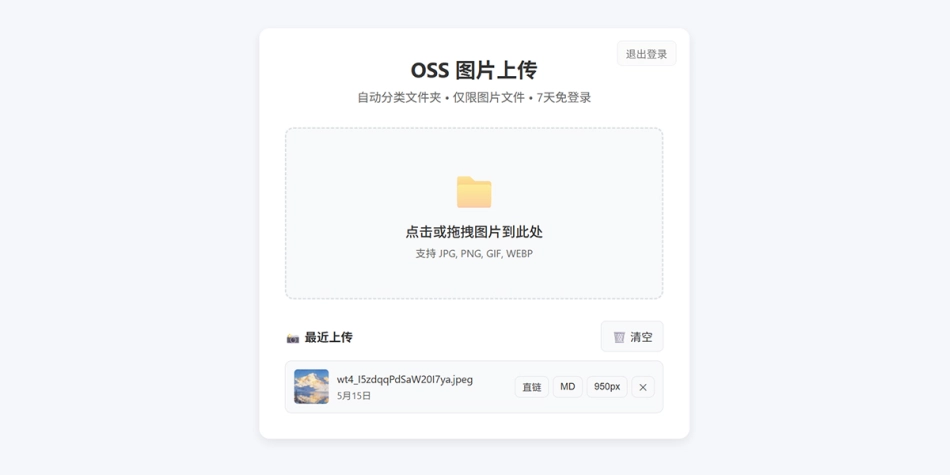
Three things first:
- This image host is simple in features, easy to configure, and secure enough. If it’s not enough for you, hand the source code to an AI — adding or removing features is trivial.
- Every
AccessKey, password, domain, and bucket name in this article is a placeholder — replace them with your own before copying anything. - The code is a single-file Node.js app (about 380 lines), with dependencies injected via an FC Layer, zero hardcoding in the business code, and all configuration read from environment variables.
Source code: https://github.com/ezzty/oss-upload
1. Why build your own image host
Every static blog basically needs an image host. Lots of people skimp by using someone else’s free-forever image host — but which good Samaritan never shuts down? And with your data in someone else’s hands, you have no initiative at all, so you’re always on edge.
After stepping on enough pits, I decided to build my own image host at rock-bottom cost. The main goals: save money, no capacity limits, and stay secure!
Most self-hosted image host setups need your own server — dozens of yuan a month plus patching yourself — or they only run in a local client, so you can’t upload from a different computer. In the end I decided to build a serverless cloud image host: upload anywhere, anytime.
Alibaba Cloud Function Compute FC + OSS + CDN
FC pay-as-you-go (near ¥0 at low traffic) + no database + zero ops, with a deployment package as small as 6KB. Infrequent uploads cost essentially nothing.
OSS image storage is pay-as-you-go — tens of GB of images run you only a few yuan a month.
Put a CDN in front and images load blindingly fast!
A personal image host isn’t a juicy attack target, but I still layered up the security: forced PoW against brute force, magic-number validation against spoofed files, triple size checks against payload flooding, a daily quota against abuse, and a 2-hour token against theft.
This setup isn’t without downsides: no multi-user support, no album management, no usage stats — you can’t even delete an image without going into the OSS console.
But it’s tiny, it’s cheap, and it’s plenty for personal use.
2. Architecture and request flow
Browser upload.html
   │  ① POST /login   {user, pass}
   │  ← 200 {token} (valid 24h)
   │  ② POST /upload  Authorization: Bearer *** + image binary
   ▼
Alibaba Cloud Function Compute FC (Node.js 18, HTTP trigger)
   │  auth / rate limit / magic-number check / size check
   │  ③ ossClient.put(key, stream)
   ▼
OSS Bucket (private read/write, public read disabled)
   │  ④ CDN origin fetch (internal network, free)
   ▼
https://img.example.com/m/26j13/ab12cd.jpg   ← public access domain
Three design trade-offs:
- Bucket set to private: no one gets direct-link read access; images are only reachable through the URL bound to the CDN domain. The moment public read is on, your bucket becomes a shared resource — others can enumerate it and leech your traffic.
- Login required to upload: otherwise people will treat your API domain as a free image host and run up your bill and storage out of control.
- Business code never touches secrets: the AK/SK exist only in environment variables — never visible in code or the repository.
3. Preparation
3.1 Activate the products
Activate Function Compute FC and Object Storage OSS (both pay-as-you-go, no upfront purchase).
3.2 Create a bucket
- Name: globally unique, e.g.
my-img - Region: pick one near you/your users, e.g.
East China 1 (Hangzhou)→oss-cn-hangzhou - Access control: Private (important)
- Storage type: Standard — that’s what frequently accessed images should use. Don’t pick Infrequent Access or Archive; those have minimum storage durations and deleting early actually costs you money.
3.3 Create a RAM user scoped to a single bucket (strongly recommended)
Many tutorials tell you to use the root account AccessKey — don’t. A leaked root AK means your entire Alibaba Cloud account is compromised.
RAM console → Policies → Create Policy → JSON tab:
{
  "Version": "1",
  "Statement": [
    {
      "Effect": "Allow",
      "Action": [
        "oss:GetObject",
        "oss:PutObject",
        "oss:DeleteObject",
        "oss:ListObjects",
        "oss:HeadObject"
      ],
      "Resource": [
        "acs:oss:*:*:my-img",
        "acs:oss:*:*:my-img/*"
      ]
    }
  ]
}
Name the policy ImageHostSingleBucket. Then:
- RAM → Users → Create User, check “Use permanent AccessKey for API call”
- Attach only the policy above to this user
- Generate the AK/SK and save them immediately to your local password manager
Several deliberate trade-offs:
- No
oss:ListBuckets— if it leaks, an attacker can’t even see which buckets you have - No
oss:CopyObject— an image host doesn’t need copy permissions; grant as little as possible - Don’t attach
AliyunOSSFullAccess— that would let your image-host AK read every data bucket you own
4. Prepare the dependency layer (Layer)
The business code only depends on ali-oss. Put it in a Layer and the code package stays a few KB.
Option A: Download the release assets directly (recommended)
The project has published a Release — both layer.zip and the code package can be downloaded directly:
https://github.com/ezzty/oss-upload/releases/latest
| Asset | Size | Contents |
|---|---|---|
layer.zip |
3.25 MB | ali-oss@6.23.0 and its dependencies — 2338 files in total |
oss-upload-code.zip |
~6 KB | index.js + package.json, the function deployment package |
Benefits: no Node.js install, no zip packing, and no “differs from what the author verified” problem caused by your local npm install pulling a newer SDK version. The layer contains only npm package source code, no secrets.
Option B: Build it yourself
When you want a different dependency version, or don’t trust a pre-made package:
mkdir -p layer-build/nodejs
cd layer-build
npm init -y
npm install ali-oss
# The directory MUST have this structure:
#   nodejs/
#     node_modules/
#       ali-oss/
#       ...its transitive dependencies
cd nodejs && zip -r ../layer.zip node_modules && cd ..
Upload
FC console → Layer Management → Create Layer:
- Name:
oss-upload-deps - Runtime: Node.js 18
- Upload
layer.zip
You only need to create the layer once. To upgrade
ali-osslater, pack a new version, publish it, and point the function at the new layer version — no business code changes needed.
5. Deploy the function
5.1 Get the business code
Recommended: use the release asset directly — download oss-upload-code.zip (~6 KB) from https://github.com/ezzty/oss-upload/releases/latest; unzip it and you have a standard deployment package.
If you pack it yourself, the zip root must contain only these two files (no wrapping folder, or the Handler won’t find index.handler):
code.zip
├── index.js        ← business source
└── package.json    ← declares dependencies (for reference; actually loaded from the layer at runtime)
zip code.zip index.js package.json5.2 Create the function
- Runtime: Node.js 18
- Handler:
index.handler - Spec: 0.05 vCPU / 128 MB memory / 512 MB disk (smallest spec that works in practice)
- Layer configuration: bind the
oss-upload-depslayer you just created
Watch the memory setting: the code reads the whole body into memory (
bodyBuf), and base64 decoding makes another copy. 128 MB is fine for regular images, but if you raise the upload cap to 20 MB and often upload near-limit images, bump the memory accordingly.
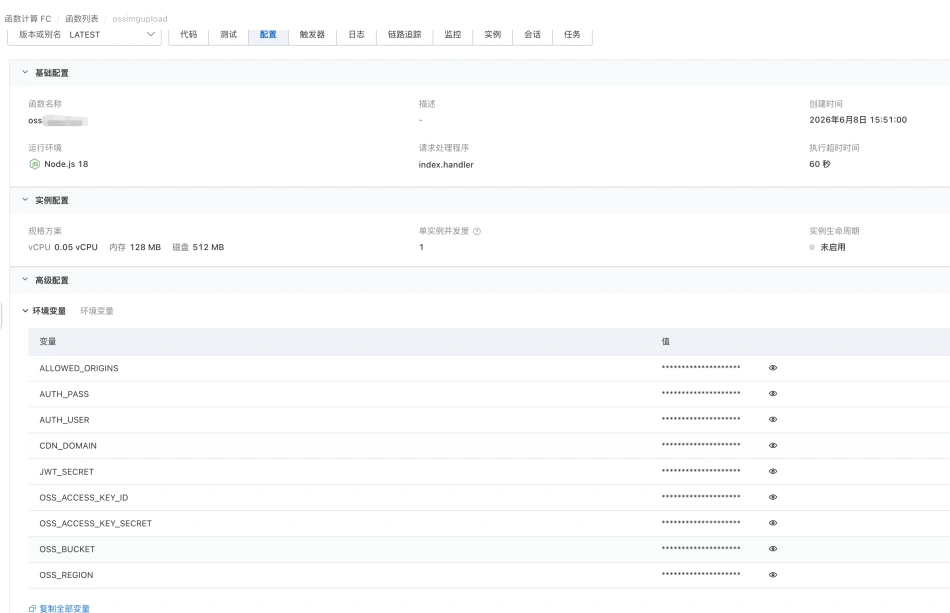
5.3 Environment variables (8 required — missing any one and it won’t start)
The function’s environment variables have 8 required entries — configure them as shown in the image.
AUTH_USERadmin— login usernameAUTH_PASS<set a strong password>— login password; use a random long stringJWT_SECRET<32+ char random string>— token signing secretOSS_ACCESS_KEY_IDLTAIxxxxxxxxxxxxxxxx— the RAM user’s AKOSS_ACCESS_KEY_SECRET<your AccessKey Secret>— the RAM user’s SKOSS_BUCKETmy-img— bucket nameOSS_REGIONoss-cn-hangzhou— the bucket’s region IDCDN_DOMAINhttps://img.example.com— must include the protocol scheme; otherwise startup fails immediately
1 optional:
ALLOWED_ORIGINSexample.com,myblog.net— allowed cross-origin sources, comma-separated. The function still starts without it; it is only consulted when code-level CORS is enabled (by default the platform just echoes back theOrigin, soisValidOriginis never called). If you do enable code-level CORS you must set it, otherwise the fallback valueexample.comwill block every browser upload.
5.4 Bind a custom domain
FC console → Domain Management → Add Domain, then follow the prompts to configure the CNAME and certificate. That’s how you get an API address like https://api.example.com.
6. Frontend page
upload.html is a single-file frontend — just drop it into your own site’s directory.
One change is mandatory — find _FC_PARTS:
// Change this to your Function Compute custom domain
const _FC_PARTS = ['https://', 'api.example.com'];
The size limit must match the backend (both default to 20MB):
if (file.size > 20 * 1024 * 1024) { /* block */ }There’s a limit on each side — the smaller one wins. Change only the frontend and large files get 413’d server-side; change only the backend and users are blocked in the browser before the request even goes out.
7. Want to go deeper? The core details are in the source README
That’s the complete flow for getting a self-hosted image host running. Why the code is written this way, the implementation details of each layer of protection, and the full acceptance checklist are all in the source repo’s README — refer to it when you need it:
https://github.com/ezzty/oss-upload → “Core implementation (code level)” and “Pre-launch acceptance” in README.md
The blog post just wants to explain “why self-host, how to get it running, what to watch out for”. When you actually deploy, the README is the complete technical documentation.
8. Cost
Pay-as-you-go, three parts:
| Item | Billing | Magnitude |
|---|---|---|
| FC compute | Compute CU (vCPU + memory × duration) + invocation count | Free quota exists; a personal image host usually sits near it |
| OSS storage | ¥/GB/month | Standard storage is about ¥0.09–0.12/GB/month |
| OSS requests | Per request | Negligible |
| CDN traffic | ¥/GB | See below |
Traffic is the bulk of the bill, and the easiest to optimize:
- Uploads to OSS: free
- OSS internal network (FC ↔ OSS in the same region): free
- OSS public internet egress: charged (roughly ¥0.5/GB, varies by time period and region)
- Going through CDN: CDN origin fetch uses the internal network, so origin traffic is free — you only pay for CDN traffic
Conclusion: always put a CDN in front of the image host — it’s faster and sidesteps OSS egress fees. Also note FC and OSS must be in the same region; cross-region goes over the public internet, which is slow and may incur extra traffic charges.
In my own testing, uploading a few dozen images a month costs about ¥1 per month.
9. Maintenance and updates
Changing business code (e.g. the image URL format):
- Edit local
index.js zip code.zip index.js package.json- Console → Code Deployment → Upload → Deploy
- Run the README’s acceptance probes to confirm the new version is live
Changing the frontend:
- Edit
upload.html - Upload it to your site; consider setting
Cache-Control: no-cache, otherwise users may get the old version
Upgrading dependencies:
- Re-run
npm install ali-ossand packlayer.zip - Publish the new layer version in the console
- Switch the function to the new layer version
Rotating keys (do this periodically):
- Generate a new AK/SK in RAM
- Update the FC environment variables → deploy
- Once you’ve confirmed the service is healthy, disable the old AK in the RAM console