With AI, I Never Worry About Leaving the Door Open Again
You’re out and about, and suddenly you think — did I forget to close the door?
I’m sure many people have felt this anxiety. I know I have. Every time I leave home, I keep replaying the memory: did I actually lock the door? Sometimes I’d already be out of the neighborhood and still run back to check.
To solve this problem, I built a “toolbox” page that puts all my home information — door status, temperature, router info — in one place, accessible anytime, anywhere.
The story starts with an image hosting service.
Starting with Image Hosting
I write a blog and sometimes need to insert images using Markdown. Using someone else’s image host always worried me. Using my own Alibaba Cloud OSS client felt too cumbersome. I never found a web-based solution that felt effortless.
Now that I have Hermes Agent, I wanted to make the most of it. I asked it to build me an image hosting service so I could upload images from my phone.
The implementation was simple:
Step one: I stated my requirement — use Alibaba Cloud OSS to create a private image host with password authentication to prevent abuse. The AI recommended using Alibaba Cloud Function Compute as the backend, with the frontend hosted anywhere.
I only did one thing: provided the Alibaba Cloud OSS API credentials.
The rest was handled by the AI.
恰好 Xiaomi was offering billions of free tokens to developers, and I managed to get some. This was also a chance to test the MiMo-v2.5-pro model. Within minutes of giving the instruction, it had built both frontend and backend code, and asked me to upload the backend to the server. After a few rounds of debugging, the OSS image upload page was ready.
Once the page was live, I felt it was too plain. Could I make it more feature-rich?
So I went ahead and built a “Toolbox.”
The Toolbox
Combining the information I check daily, I first built stock market and cryptocurrency price displays using Tencent Finance and OKX APIs.
These tools were extremely simple since all the data comes from external APIs. Next, I wanted to try something more advanced.
What I wanted to see:
- Whether the door at home is closed (this requires Docker to install Home Assistant with the Xiaomi miot plugin)
- Router status
- Server status
My home network runs on a Linux mini PC, and I also have a Linux environment on the public internet. But the public server can’t access my home network. The AI suggested several approaches, and I decided to collect data from the home network and push it to the public server.
Technical Implementation
The core of the entire system is data collection and pushing.
Home Status
Home Assistant connects various smart devices: door locks, temperature/humidity sensors, air purifiers, and more.
I wrote a local collection script that fetches data from the Home Assistant API every minute and uploads it to the public server.
The door status uses a door/window sensor that detects whether the door is open or closed via a magnet. Temperature and humidity sensors are placed outdoors, indoors, and in the server cabinet, so I can monitor the home environment at any time.
Router Status
The router runs OpenWrt. Through LuCI’s web API, I can get CPU temperature, uptime, online user count, and other info. I wrote a shell script that collects data every 5 minutes and uploads it via SCP.
Server Status
Server status is even simpler — just read system files directly for CPU temperature, memory usage, disk space, and other metrics.
The Result
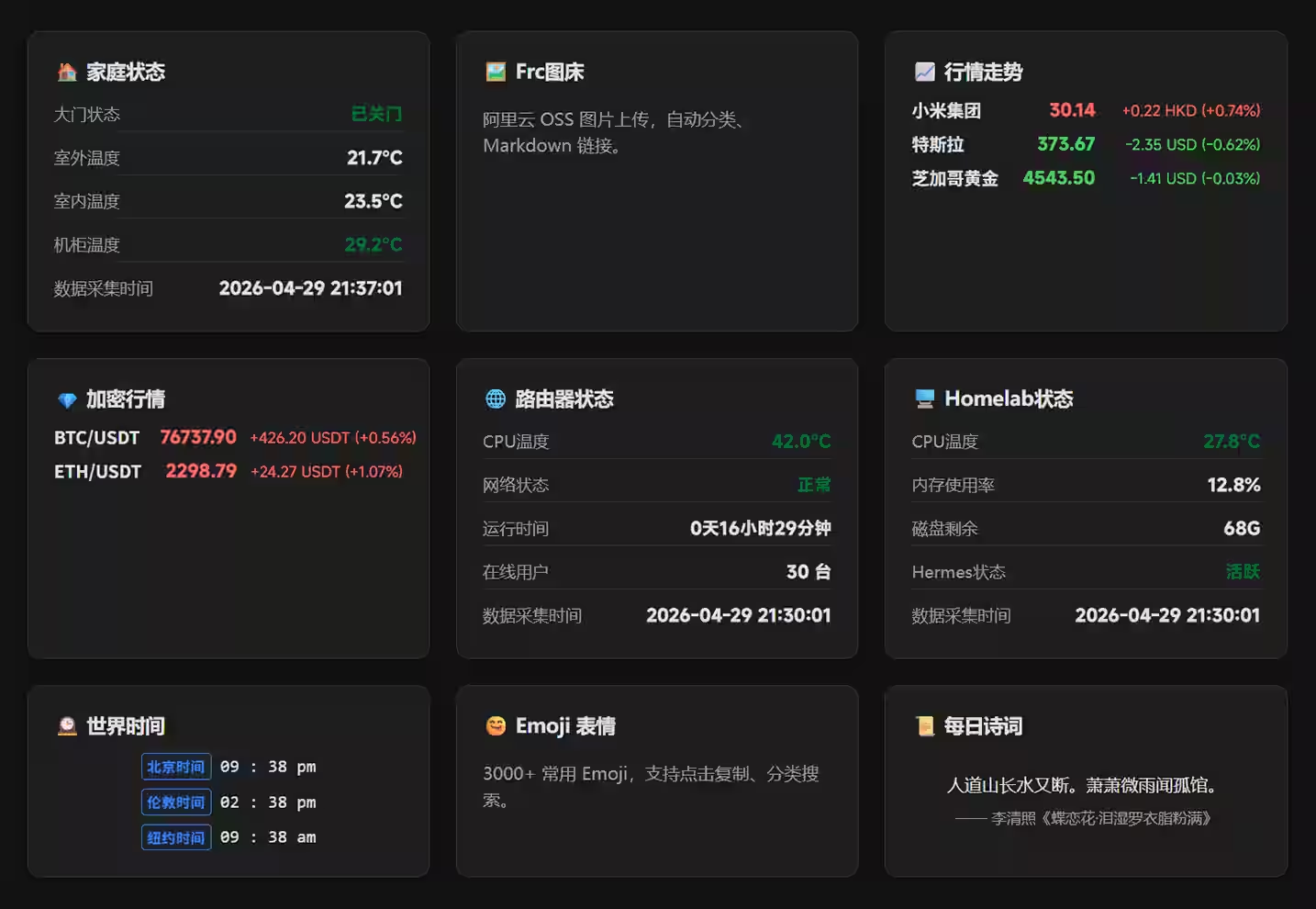
Now, whenever I open the toolbox page, I can see:
- Home Status: Whether the door is closed, indoor/outdoor temperature, cabinet temperature
- Market Trends: Prices for Xiaomi, Tesla, and Gold
- Crypto: Real-time prices for BTC and ETH
- Router Status: CPU temperature, online user count
- Homelab Status: Server CPU, memory, and disk usage
- World Clock: Time in Beijing, London, and New York
- Daily Poetry: A random classical Chinese poem
The entire page also supports PWA, so it can be added to the phone’s home screen and used like a native app.
Making the Most of It
The value of this toolbox lies in consolidating information scattered across different platforms into one place.
Before, checking the door lock required opening the Mi Home app. Checking router status meant opening a browser and typing the IP. Checking stock prices required opening a trading app.
Now, one page handles everything.
And because I built it myself, I can add new features anytime. For example, I might add weather forecasts, package tracking, or calendar reminders later.
But honestly, I can’t think of more features I need right now. This is good enough for now.